

Step 1: Access Your Dashboard
Visit the Expertise Dashboard to find the unique script for embedding the chatbot on your site.Step 2: Locate and Copy the Code
In the “Add to Website” section of the dashboard, click the “Copy” button to copy the script to your clipboard. “Add to Website” section of the dashboard
Step 3: Log In to Your Wix Site
Log in to your Wix site’s dashboard where you’ll be adding Expertise.Step 4: Navigate to the Site Custom Code Section
Click on “Settings” in the site dashboard. Choose “Custom Code” under the “Advanced Settings” area. Or Click on “Add Elements” in the site. Click on “Marketing Tools” and “Custom Code”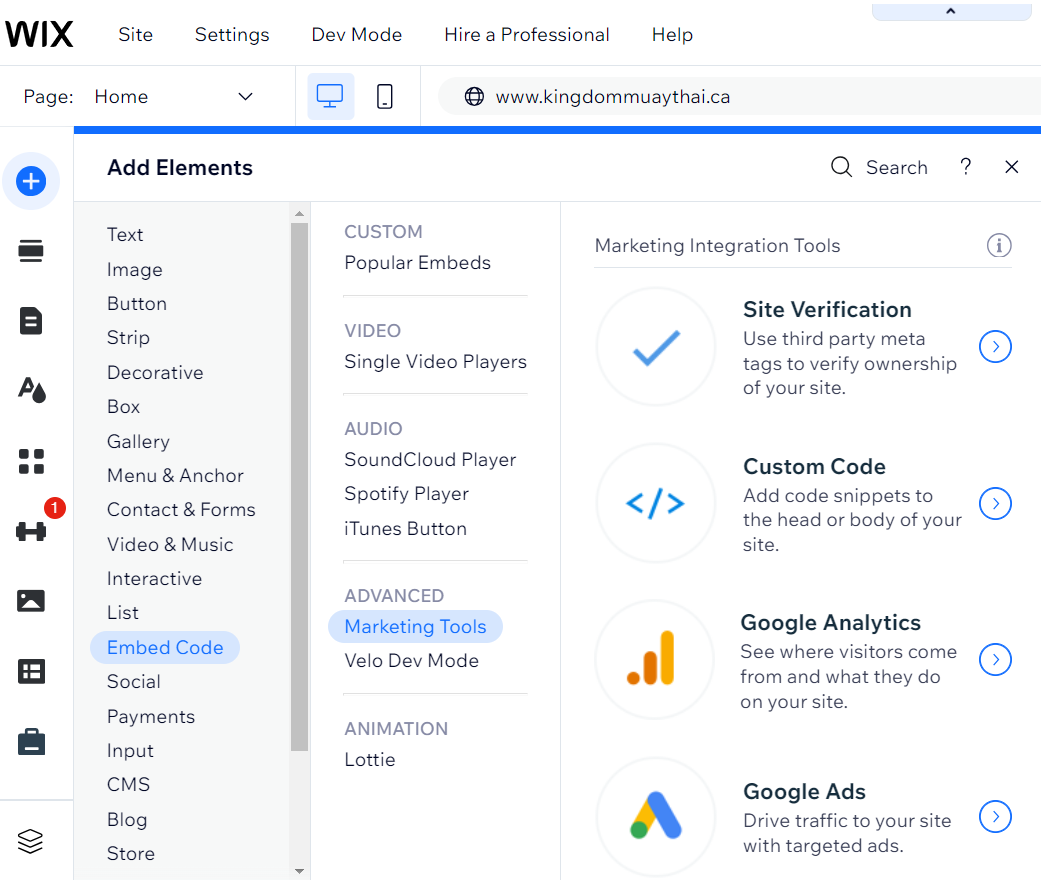
Step 5: Add the Expertise Code
- Click ”+ Add Custom Code” button.
- Paste the Expertise code copied from Step 2 into the code field.
- Select “Head” from the dropdown for where the code will be placed.
- Enter a name for the code, such as “Expertise Integration.”
- Set the code to load on “All Pages” or choose specific pages as needed.
- Click “Apply”.